

In 2026, Microsoft Excel has transcended its origins as a simple grid of numbers. It has evolved into a sophisticated Business Intelligence (BI) engine, fully integrated with Microsoft Copilot AI and capable of handling massive datasets through Power Query and Python in Excel. If you are a finance professional, a marketer, or an entrepreneur, your ability to manipulate data in Excel is the direct “bandwidth” of your decision-making power.
The “Golden Rule” of 2026 Excel learning is Applied Automation. It’s no longer enough to manually sort a list; you must understand how to build dynamic arrays, use XLOOKUP over VLOOKUP, and leverage Generative AI to write complex formulas. The platforms that have dominated 2026 are those that offer hands-on practice files and real-world business scenarios.
The most effective way to master Excel is through Contextual Problem Solving—taking raw data and turning it into a visual story. This step-by-step guide to the top 5 free Excel websites of 2026 will show you exactly how to reach “Power User” status for $0.

1. Microsoft Learn: The Official Ecosystem Authority
In 2026, Microsoft Learn is the undisputed “Source of Truth.” As the official training wing of Microsoft, this platform provides the most up-to-date documentation and interactive modules for the latest version of Excel (Microsoft 365).
- The Copilot Era: New for 2026, Microsoft Learn features dedicated paths on “Excel with Copilot.” You’ll learn how to use natural language prompts to generate formulas, summarize trends, and create entire dashboards from a single sentence.
- Role-Based Paths: Whether you are a “Data Analyst” or a “Project Manager,” Microsoft Learn offers curated modules tailored to your specific career. This ensures you aren’t learning every single function, but the 20% of functions that drive 80% of your results.
- Sandbox Environments: In 2026, Microsoft Learn provides free, browser-based “Sandboxes.” You don’t even need to have Excel installed on your computer to complete the labs; the website spins up a virtual instance of Excel for you to practice in.
- Official Digital Badges: Upon completing a “Learning Path,” you receive an official Microsoft digital badge. In the 2026 job market, these “Verified Skills” badges are natively integrated with LinkedIn and highly respected by recruiters.
A common mistake to avoid is ignoring the “What’s New” section. Excel updates monthly in 2026. A formula that was standard in 2024 (like nested IF statements) might be completely obsolete today thanks to IFS or LET functions.
2. Coursera (Specializations via Audit Mode): The Academic Elite
Through partnerships with institutions like Macquarie University and the University of Colorado, Coursera offers the most rigorous academic approach to Excel. In 2026, the “Excel Skills for Business” specialization remains the world’s most popular Excel curriculum.
- The “Audit” Hack: While the certificates cost money, you can click the tiny “Audit” button on the individual course pages to access 100% of the video lectures, reading materials, and practice files for free.
- Business Forecasting & Modeling: This isn’t just about cells and rows. You’ll learn Financial Modeling, Sensitivity Analysis, and Forecasting—the high-level skills that separate a data entry clerk from a Senior Analyst.
- Excel Skills for Data Analytics: In 2026, Coursera has introduced a specialized path on “Python in Excel.” You’ll learn how to write Python code directly inside a cell to perform advanced statistical analysis without ever leaving the spreadsheet.
- Project-Based Learning: Every module ends with a “Business Challenge.” You are given a messy dataset from a fictional company and must use Power Query to clean it and Pivot Tables to report the findings.
3. Exceljet: The “Quick-Reference” Masterclass
If you need to know how a specific function works right now, Exceljet is the 2026 champion of clarity. It is the best resource for intermediate users who want to move beyond the basics and master complex formula logic.
- Formula “Building Blocks”: Exceljet doesn’t just give you a formula; they break down the logic. They explain how
INDEXandMATCHwork together like a GPS, or whySUMPRODUCTis the “Swiss Army Knife” of arrays. - 200+ Video Lessons: Their free “Core Formula” video series is legendary. Each video is under 5 minutes, focusing on a single, high-impact technique like “Dynamic Named Ranges” or “Conditional Formatting with Formulas.”
- Advanced “Dynamic Arrays”: In 2026, Exceljet is the leading authority on the “New Excel” (Dynamic Arrays). They provide detailed guides on FILTER, SORT, UNIQUE, and SEQUENCE, which have replaced 90% of old-school VLOOKUP workflows.
- The “Shortcuts” Library: They offer the most comprehensive list of keyboard shortcuts for both Windows and Mac. In 2026, “Mouse-free” navigation is the hallmark of a true Excel expert.
4. Excel Easy: The Visual Beginner’s Guide
For those who find video tutorials too slow, Excel Easy provides a fully illustrated, 300+ example textbook online. In 2026, it remains the most accessible “entry point” for absolute beginners.
- Fully Illustrated Tutorials: Every step is accompanied by a clear screenshot. If you are a visual learner who prefers to read at your own pace, this is significantly more efficient than a 10-hour video course.
- “Project Management” Templates: They offer a massive library of free, downloadable templates for Gantt Charts, Project Timelines, and Budget Trackers. You can reverse-engineer these files to learn how pros build tools.
- VBA & Macros for Beginners: While VBA is older technology, it is still vital for “Legacy Automation” in 2026. Excel Easy provides the simplest “No-Fear” introduction to recording macros and writing basic subroutines.
- Data Analysis “Lab”: They have a dedicated section on Regression Analysis, ANOVA, and Solver. If you are a student or a scientist, this is the best place to learn “Hard Science” in Excel for free.
5. freeCodeCamp (YouTube & Web): The “Full Course” Powerhouse
freeCodeCamp has become the 2026 leader in “Long-Form” technical education. Their “Microsoft Excel Full Course” (often 10+ hours long) is the definitive “Bootcamp” experience for $0.
- Zero-to-Hero Continuity: Because it’s one long video, the curriculum is perfectly linear. You start with “What is a Cell?” and end with “Building an Interactive Financial Dashboard.”
- Data Visualization Mastery: Their 2026 update focuses heavily on Modern Charting. You’ll learn how to build “Waterfall Charts,” “Sunburst Diagrams,” and “Map Charts” that look like they were made in a premium BI tool.
- Power BI Integration: freeCodeCamp understands that Excel is a “Gateway.” Their courses often show you how to take your Excel data and import it into Power BI for enterprise-level reporting.
- Crowdsourced Troubleshooting: The comment section on a freeCodeCamp Excel video is a “Global Help Desk.” In 2026, if you have a specific error, someone in the community has likely already provided the fix in the thread.
Comparison: Which Excel Site Matches Your Goal?
| Platform | Best For | Training Style | 2026 “Pro” Feature |
| Microsoft Learn | Professionals | Official / Interactive | Copilot AI Training |
| Coursera | Data Analysts | Academic / In-depth | Python in Excel Modules |
| Exceljet | Intermediate Users | Logical / Fast | Dynamic Array Mastery |
| Excel Easy | Visual Beginners | Illustrated / Text | Template Reverse-Engineering |
| freeCodeCamp | Bootcamp Seekers | Long-form Video | Full Dashboard Builds |
The 2026 “Excel Power User” Routine: 3 Steps to Mastery
To become the most “Efficient Employee” in the room, follow the “Automation First” protocol:
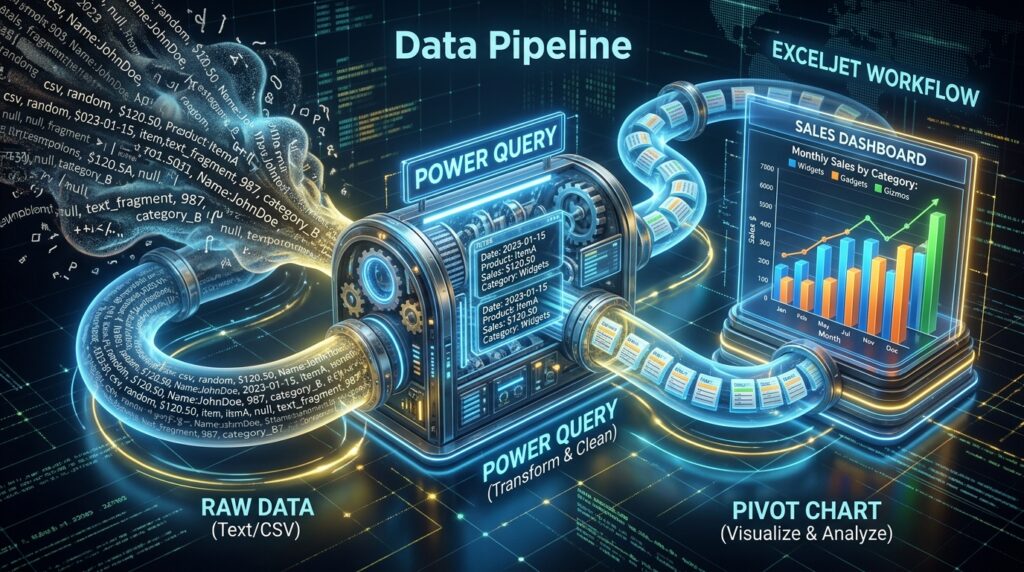
- Phase 1: The “Clean” Foundation (Power Query): Spend 1 hour on Microsoft Learn or Exceljet mastering Power Query. In 2026, 80% of Excel work is “Cleaning Data.” If you are manually copying and pasting, you are doing it wrong.
- Phase 2: The “Logic” Engine (XLOOKUP & IFS): Move to Exceljet. Stop using VLOOKUP and nested IFs. Master the “New Standards” that are faster, more readable, and less likely to break.
- Phase 3: The “Story” (Interactive Dashboards): Use freeCodeCamp or Coursera to build a dashboard. A pro doesn’t send a “sheet of numbers”; they send a “single-page summary” that answers every question before it’s asked.
Final Thoughts
Excel in 2026 is a Force Multiplier. It is the tool that turns a “good” worker into an “irreplaceable” one. By leveraging the official authority of Microsoft, the academic rigor of Coursera, and the logical clarity of Exceljet, you are gaining a skill that is recession-proof and globally recognized.
The data is ready. The tools are free. Your only job is to stop “using” Excel and start “mastering” it.






Leave feedback about this