

If you are a web developer, the shift from Manifest V2 to Manifest V3 is one of the most significant changes in the browser ecosystem. Google’s transition to MV3 aims to improve privacy, security, and performance, but it also changes how extensions handle background tasks and network requests.
The most effective way to future-proof your development is to master the new Service Worker architecture and the declarativeNetRequest API. This step-by-step guide to Manifest V3 will help you navigate these changes without breaking your existing code logic.

1. Understanding Service Workers vs. Background Pages
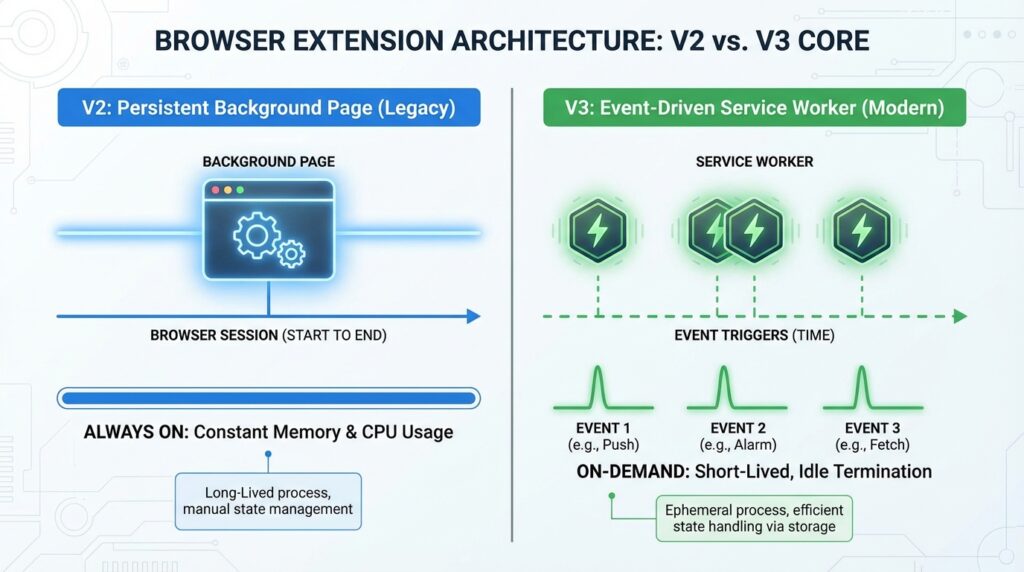
In Manifest V2, background pages were persistent, staying open in the background and consuming memory. A common mistake to avoid is trying to use the window or DOM in your background scripts.
In Manifest V3, background pages are replaced by Service Workers. They are ephemeral—they start when needed and stop when idle. This significantly reduces the memory footprint of your extension.
2. The Move to DeclarativeNetRequest
Security is a major focus of MV3. Instead of the old webRequest API, which allowed extensions to see all user traffic, we now use declarativeNetRequest. Based on industry research, this change prevents extensions from reading sensitive data while still allowing them to block or redirect requests based on rules you define in your JSON manifest.
3. Updated Security Policy (CSP)
Manifest V3 tightens the Content Security Policy. You can no longer execute “remote code” or strings as code (like eval()). All logic must be bundled within the extension package itself. This ensures that your extension remains secure and cannot be hijacked by external malicious scripts.
4. How to Update Your manifest.json
To get your extension ready, you must update your version key:
- Change
"manifest_version": 2to"manifest_version": 3. - Update
backgroundscripts tobackground.service_worker. - Move your permissions from
permissionstohost_permissionswhere applicable.
Final Thoughts
Transitioning to Manifest V3 might feel like a hurdle, but it results in faster, more secure extensions that users trust. By adopting these standards early, you ensure your extension stays listed on the Chrome Web Store and performs optimally on modern hardware.
Leave feedback about this