
Nothing ruins a product launch faster than a client reporting that your website looks broken on Safari or “feels laggy” on Firefox. Cross-browser compatibility isn’t about making every site look identical in every browser; it’s about Graceful Degradation—ensuring the site remains functional and accessible regardless of the platform.
The most effective way to avoid these headaches is to test early and use modern CSS techniques that handle browser differences automatically. This step-by-step guide to cross-browser testing will give you a foolproof checklist to ensure your code is robust, performant, and error-free everywhere.
1. Start with a Modern CSS Reset
Browsers come with their own default styles (User Agent Stylesheets). A common mistake to avoid is assuming margin: 0 is enough.
- Use a modern reset like Aindre’s Modern Reset or Normalize.css.
- This ensures that “base” elements like buttons, inputs, and headings start from the same visual point in every browser engine (Blink, WebKit, and Gecko).
2. Leverage “Autoprefixer” for CSS Vendor Prefixes
While many CSS properties are now standard, new features (like certain CSS Grid properties or experimental filters) still require prefixes like -webkit- or -moz-.
- Based on industry research, manually writing prefixes is prone to error. Use a build tool or a VS Code extension like Autoprefixer to handle this during your development workflow.
3. Check for Feature Support with @supports
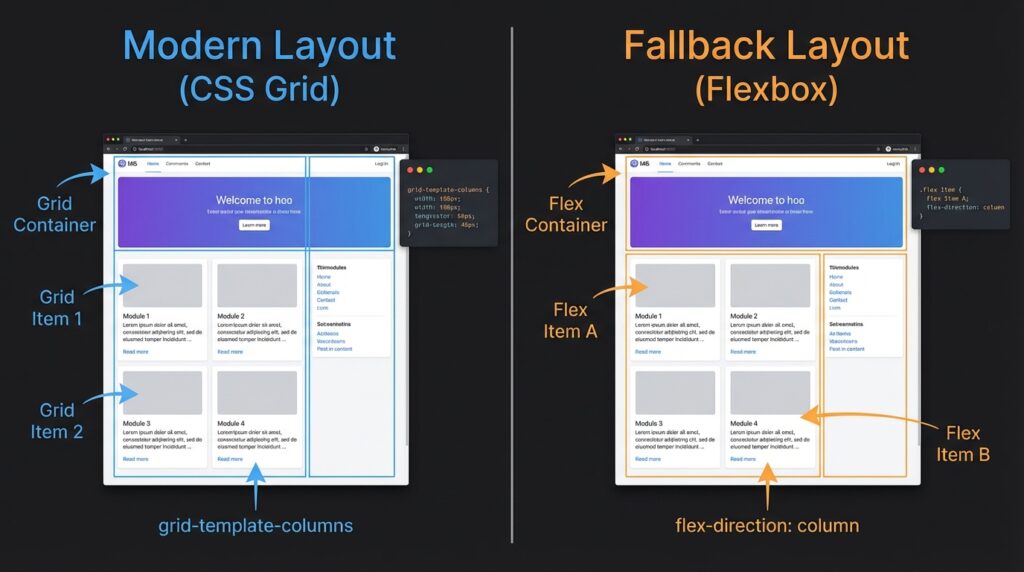
Instead of using complex JavaScript hacks to detect browsers, use the native CSS @supports rule (also known as Feature Queries).
- The most effective way to use this is by providing a “fallback” layout for older browsers and an “enhanced” layout for those that support newer features like
subgridoraspect-ratio.
4. Test on Real WebKit (Safari)
Safari is the new Internet Explorer. Because it uses the WebKit engine (unlike Chrome and Edge which use Blink), it often renders shadows, gradients, and flex-containers differently.
- Pro-Tip: If you don’t own a Mac, use tools like BrowserStack or Playwright to run tests on actual WebKit instances.
5. Validate Accessibility (A11y)
Cross-browser compatibility isn’t just visual; it’s functional.
- Ensure that keyboard navigation (Tab-key) works the same way in Firefox as it does in Chrome.
- Check that
aria-labelsare read correctly by screen readers across different OS/Browser combinations (e.g., VoiceOver on Safari vs. NVDA on Chrome).
Final Thoughts
A website that works on “my machine” is only half-finished. By following this checklist and focusing on feature detection rather than browser sniffing, you build resilient web applications that stand the test of time and technology shifts.

Leave feedback about this