


In the high-speed digital world of 2026, the term “clipart” has undergone a massive rebrand. We aren’t talking about the pixelated, cheesy office graphics of the 1990s. Modern clipart—now often called “vector illustrations” or “flat icons”—is the backbone of effective communication. From classroom worksheets that engage young minds to social media posts that stop the scroll, the right graphic can simplify a complex idea in a single glance.
The most effective way to stand out in 2026 is to use “Consistent Visual Sets”—graphics that share the same color palette and line weight. This step-by-step guide to the top free clipart sources will help you move past generic images to find high-end, professionally designed assets for $0.

1. Openclipart: The “Public Domain” Powerhouse
In 2026, Openclipart remains the world’s largest library of 100% free, community-driven graphics. It is unique because every single item on the site is released under the Creative Commons Zero (CC0) license.
- Absolute Legal Freedom: Because it is public domain, you can use these graphics for anything—commercial products you sell, classroom materials, or even your company logo—without ever needing to give credit.
- SVG First: Almost every graphic is available as an SVG (Scalable Vector Graphic). This means you can stretch a small icon of a pencil to the size of a billboard, and it will remain perfectly crisp.
- The Community Spirit: It is a “Living Library.” In 2026, the community is highly active, contributing thousands of new items daily that reflect current trends, such as remote work symbols, sustainable energy icons, and diverse character sets.
- Unlimited Downloads: No daily limits, no “Pro” accounts, and no “Free Trial” pop-ups. It is the purest form of the open web.
A common mistake to avoid is searching for “trendy” or “aesthetic” terms. Openclipart is organized by utility. Instead of searching for “Cool vibes,” search for “Geometric pattern” or “Abstract leaf” to find the building blocks for your design.
2. Canva (Elements Library): The Designer’s Shortcuts
While Canva is a full design suite, its “Elements” library has become the largest curated clipart collection in 2026. It is the best choice for those who want to edit their graphics as they go.
- Smart Branding: When you select a piece of clipart in Canva, you can often change the individual colors of the graphic to match your brand’s specific hex codes.
- “Magic Recommendations”: When you pick an icon you like, Canva’s AI suggests “Magic Recommendations” from the same artist or style. This is the secret to making a multi-page presentation look like a cohesive professional brand.
- The “Character Builder”: New for 2026, Canva’s clipart includes modular characters. You can swap heads, bodies, and poses to create unique mascots for your project without needing drawing skills.
- The License: While “Free” elements are truly free, always check the “three-dot” menu on an item to ensure it is covered under the Free Content License for your specific use case (especially for resale).
3. unDraw: The Tech & Startup Specialist
If you want your project to look like it was designed by a Silicon Valley agency, unDraw is your tool. It has defined the “Modern Flat” aesthetic of the mid-2020s.
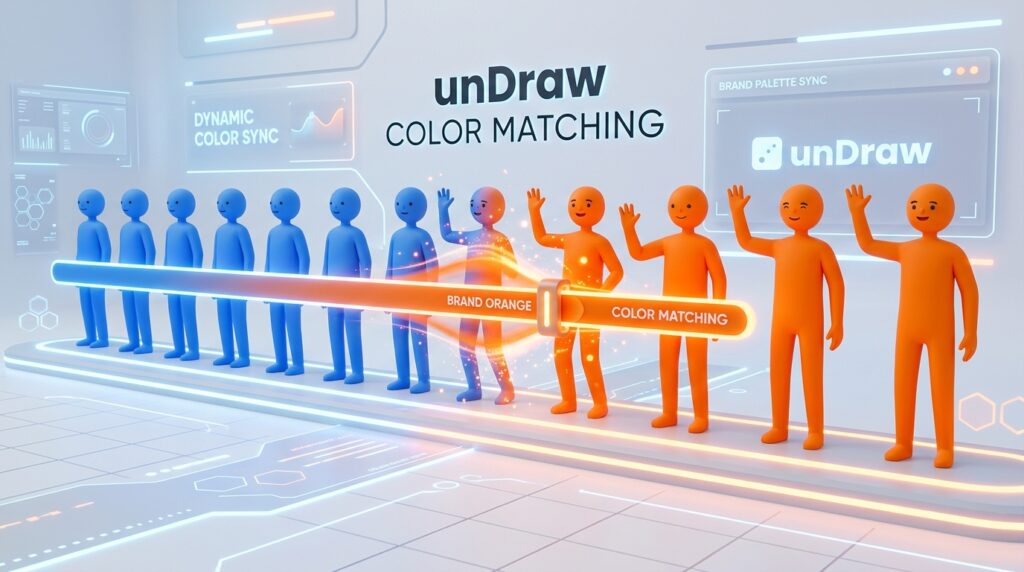
- The Color-Sync Slider: The most famous feature of unDraw in 2026 is the real-time color picker. You select one color at the top of the page, and every illustration in the entire library instantly switches to that color.
- Scene-Based Storytelling: Instead of just “objects,” unDraw provides “scenes”—a person working at a desk, a team brainstorming, or a user interacting with a smartphone.
- Zero Attribution: Like Openclipart, unDraw uses an incredibly permissive license. You can use their work on your commercial landing page without a single link back.
- SEO Optimized: Their SVGs are incredibly “light,” making them the preferred choice for web designers who need fast-loading pages in 2026.
4. Classroom Clipart: The Educator’s Essential
For the teachers and parents of 2026, Classroom Clipart provides a safe, curated, and highly organized environment for educational materials.
- Curriculum-Focused: The site is organized by school subjects—Biology, Geography, History, and STEM. This makes it 10x faster to find a “Tudor House” or a “Mitosis Diagram” than a general search engine.
- Print-Ready Resolution: While many sites focus on the web, Classroom Clipart ensures their images have the high DPI required for clear, crisp printing on home or school printers.
- Safety First: The site is “Ad-Lite” and strictly curated to ensure no inappropriate content ever appears in search results, making it safe for students to use for their own projects.
- The “Black & White” Filter: A favorite for 2026 is their “Outline” section, which provides black-and-white versions of graphics—perfect for coloring pages and low-ink printing.
5. Icons8 Ouch!: The High-End Creative Hub
Ouch! (by Icons8) is where you go when you need “Trend-Forward” clipart that looks like it belongs in a high-fashion magazine or a premium mobile app.
- Diverse Artistic Styles: Unlike unDraw’s single style, Ouch! features 20+ distinct “Styles”—from 3D-claymorphic characters to hand-drawn “lo-fi” doodles and vibrant “Memphis” designs.
- Transparent PNGs: For the free tier, Ouch! provides high-quality PNGs with transparent backgrounds, making them perfect for “layering” over your own photos.
- The “Mega Creator” Integration: You can take an icon from Ouch! and drop it into their “Mega Creator” tool, which allows you to “mix and match” elements from different artists into a single original scene.
- The “Link Back” Rule: This is the trade-off: for the free tier in 2026, Icons8 generally requires a link back or attribution. If you need the highest quality visuals and don’t mind a small credit line, this is your best source.
Comparison: Which Clipart Tool Fits Your Task?
| Platform | Best For | Licensing | Format |
| Openclipart | Absolute Freedom | CC0 (Public Domain) | SVG / PNG |
| Canva | Quick Marketing | Canva Free License | Integrated Editor |
| unDraw | Web & Tech | No Attribution Req. | Scalable SVG |
| Classroom Clipart | Teachers/Students | Personal/Edu Use | High-Res PNG |
| Icons8 Ouch! | Professional Design | Attribution Req. | PNG (Free) |
Pro Tip: The “SVG-to-PowerPoint” Hack
Based on industry research, many users don’t realize that in 2026, Microsoft PowerPoint and Google Slides can handle SVGs natively.
- Download an SVG from Openclipart or unDraw.
- Drag it into your slide.
- Right-click and select “Convert to Shape.”
- Now you can change the color of individual parts of the clipart (like the person’s shirt or the sky) directly inside your presentation software!
Final Thoughts
Clipart is no longer the “budget” option; it is a strategic design choice. By using the legal freedom of Openclipart, the branding power of unDraw, and the educational focus of Classroom Clipart, you can communicate your message with clarity and professionalism without a single cent of expense.






