

In 2026, CSS is no longer just about “colors and fonts.” We have entered the era of Spatial Styling and Dynamic Motion. With the widespread adoption of CSS Container Queries, Anchor Positioning, and Scroll-Driven Animations, the complexity of hand-coding modern layouts has skyrocketed. If you are still manually calculating cubic-bezier curves or typing out complex grid-template-areas, you are losing hours of productive creative time.
The “Golden Rule” of 2026 web design is Visual Prototyping. You should see your design change in real-time as you toggle properties. The platforms that have dominated 2026 are those that offer Live Previews, Clean Code Export, and support for the latest CSS4 and CSS5 specifications.
The most effective way to elevate your brand’s digital presence today is to leverage tools that bridge the gap between “Graphic Design” and “Clean Code.” This step-by-step guide to the top 5 free CSS generators of 2026 will show you how to build a world-class UI for $0.
1. Neumorphism.io: The “Soft UI” Specialist
In 2026, Neumorphism (Soft UI) has evolved from a trend into a core design philosophy for high-end SaaS products and mobile-first web apps. This style relies on subtle, precise shadow calculations to create a “plastic” look that mimics physical objects. Neumorphism.io is the undisputed champion for generating these complex effects.
- Dynamic Shadow Logic: Neumorphism relies on two shadows—one light and one dark—to create depth. This tool calculates the exact hex codes for your highlights and shadows based on your background color, ensuring your UI elements look “extruded” or “inset” perfectly.
- Lighting Direction Control: In 2026, “Consistency of Light” is a hallmark of professional design. You can pick the light source (top-left, bottom-right, etc.), and the tool automatically adjusts all shadow offsets to maintain a coherent 3D environment across your entire site.
- Shape & Blur Customization: You can toggle between flat, concave, and convex surfaces. This is vital for creating interactive buttons that feel like they are actually being “pressed” when a user clicks them.
- One-Click CSS Export: It generates clean, production-ready code using the
box-shadowandborder-radiusproperties. For a developer working on a sleek dashboard, this tool saves 20 minutes of “guess-and-check” per element.
A common mistake to avoid is overusing Neumorphism. In 2026, accessibility is a major SEO factor. Because Neumorphism relies on low-contrast shadows, ensure your buttons have clear text or icons to meet WCAG accessibility standards. Use Neumorphism for “Cards” and “Panels,” but keep your “Call to Action” (CTA) buttons high-contrast.
2. Layoutit!: The “Grid & Flexbox” Architect
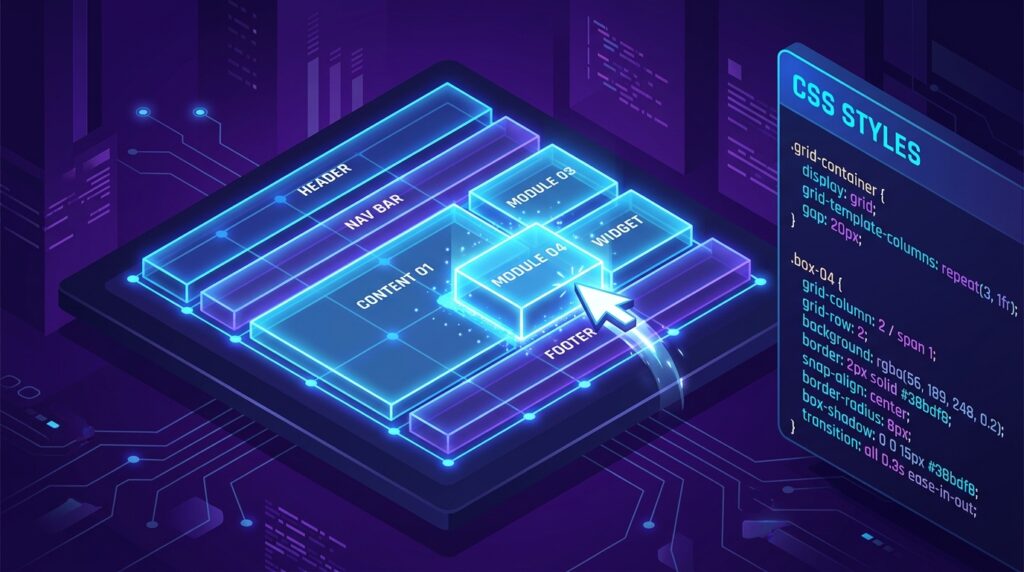
Layouts are the “skeleton” of your website. In 2026, CSS Grid has become the industry standard for complex, responsive designs. Layoutit! is the premier tool for visually drawing your grid and generating the associated HTML and CSS.
- Drag-and-Drop Grid Drawing: Instead of writing
grid-template-columns: repeat(3, 1fr), you simply draw your boxes on a canvas. You can merge cells, create “Gaps,” and define “Areas” visually. For a developer building a complex news site or a dashboard, this is a life-saver. - Interactive Flexbox Builder: If you need a flexible navigation bar or a centered hero section, their Flexbox generator allows you to toggle properties like
justify-contentandalign-itemsand see the items shift instantly. In 2026, “Visualizing the Axis” is the fastest way to learn Flexbox. - CodePen Integration: Layoutit! allows you to export your finished layout directly to CodePen with one click. This is the ultimate tool for “Prototyping.” You can build the layout, test it in a sandbox, and then drop it into your main project.
- Clean HTML/CSS Output: Unlike some “No-Code” builders that produce “div soup,” Layoutit! generates semantic HTML5 and clean, modern CSS that is easy to read and maintain.
3. Poper (CSS Animation Generator): The “Motion” Specialist
In 2026, “Static” is boring. To keep users engaged, your site needs Micro-Interactions. Poper has emerged as the 2026 leader in generating complex @keyframes animations without the headache of manual timing functions.
- 39 Animation Types: Poper offers a massive library of 12 “Classic” animations (Bounce, Fade, Slide), 9 “Modern” effects (Glitch, Typewriter, Gradient Shift), and 18 “Advanced” motions (3D Card Flip, Reveal Mask). This variety allows you to add personality to your brand without using heavy JavaScript libraries.
- Visual Keyframe Editor: You can adjust the Duration, Delay, and Iteration Count using sliders. Seeing the animation loop in real-time allows you to fine-tune the “Feel”—making an entrance effect feel “Snappy” rather than “Sluggish.”
- Three Trigger Modes: You can choose when the animation fires: On Load (for entrance effects), On Hover (for interactive buttons), or On Click/Focus. In 2026, “Trigger-Based Motion” is essential for a high-converting UI.
- Glitch & 3D Effects: Poper specializes in complex modern styles. Generating a “Glitch” effect by hand requires 50+ lines of CSS; Poper does it in 5 seconds.
4. CSSGradient.io: The “Depth & Color” Expert
In 2026, flat colors are a thing of the past. High-end brands use Mesh Gradients and Multi-Stop Transitions to create a sense of premium quality. CSSGradient.io is the most robust free tool for creating these visual “vibrations.”
- Unlimited Color Stops: You can add 10, 15, or even 20 different color stops to a single gradient. In 2026, “Complex Linear Gradients” are used to mimic the look of metallic surfaces or deep space.
- Linear, Radial, & Conic Support: While most tools stop at “Linear,” CSSGradient allows you to create Conic Gradients—perfect for “Loading Spinners” or “Color Wheels.”
- Gradient-to-Image Backgrounds: You can overlay your gradient on top of an image directly in the tool to see how they blend. This is the #1 way to create readable “Text Over Image” sections for your blog or homepage.
- HEX, RGB, & HSL Support: For developers, having multiple color formats is vital. In 2026, HSL (Hue, Saturation, Lightness) is preferred for creating design systems, and this tool supports it natively.
5. Glassmorphism.com: The “Translucent” Hub
Following the success of Apple’s “Vibrancy” effect, Glassmorphism has dominated 2026 web aesthetics. This style uses background blurs and semi-transparent borders to create a “Frosted Glass” look. Glassmorphism.com is the dedicated tool for this high-performance style.
- Real-time Blur Control: The secret to glassmorphism is the
backdrop-filter: blur(). This tool allows you to adjust the blur intensity from “Mild Frost” to “Opaque” while seeing how it interacts with the background. - Border & Transparency Tuning: You can add a subtle, 1px white border with 20% opacity to create the “Edge” of the glass. In 2026, these “Micro-Details” are what separate an amateur site from a professional one.
- Browser Compatibility Warning: Not all 2026 browsers handle
backdrop-filterequally. The tool provides a “Fallback Code” snippet to ensure your site still looks good for users on older browsers or high-performance-restricted devices. - Multi-Layer Preview: You can stack “Glass” layers on top of each other to see how the blurs compound. For a developer building a modern macOS-style web app, this is an essential prototyping tool.
Comparison: Which CSS Generator Matches Your Design?
| Platform | Best For | 2026 “Pro” Feature | Code Style |
| Neumorphism.io | Soft UI / Buttons | Lighting Direction Logic | Box-Shadow Heavy |
| Layoutit! | Grids / Layouts | CodePen One-Click Sync | Semantic Grid/Flex |
| Poper | Motion / Glitch | 39 Animation Templates | @keyframes based |
| CSSGradient.io | Backgrounds | Conic & Multi-Stop Support | Linear/Radial Gradient |
| Glassmorphism | Translucent UI | Backdrop-Filter Tuning | Blur & Transparency |
The 2026 “Style Success” Protocol: 3 Steps to a Perfect UI
A generator is a starting point, not the finish line. To ensure your 2026 UI is unshakeable, follow the “Structure-Style-Animate” protocol:
- Phase 1: The “Skeleton” (Layoutit!): Always start with the layout. Draw your grid first. Ensure your site is “Responsive by Design” before you add a single drop shadow. In 2026, a “Broken Layout” is a death sentence for your bounce rate.
- Phase 2: The “Skin” (Neumorphism / Glassmorphism): Apply your visual style. Use Glassmorphism for your navigation bars and Neumorphism for your interactive cards. Maintain a consistent “Light Source” to ensure your 3D effects look realistic.
- Phase 3: The “Life” (Poper): Add micro-interactions. Use a “Pulse” animation for your primary CTA or a “Glitch” effect for your headers. In 2026, Motion = Meaning. Every animation should serve a purpose (e.g., “Look at this button”).
Final Thoughts
In 2026, CSS is the “Emotional Layer” of your brand. It determines if a user feels “Stressed” by a cluttered layout or “Inspired” by a sleek, frosted-glass interface.
By leveraging the “Spatial Logic” of Layoutit!, the “Soft UI” of Neumorphism.io, or the “Visual Motion” of Poper, you are effectively hiring an elite design agency for $0. The specs are advanced. The tools are free. Your only job now is to Design the Experience.





